
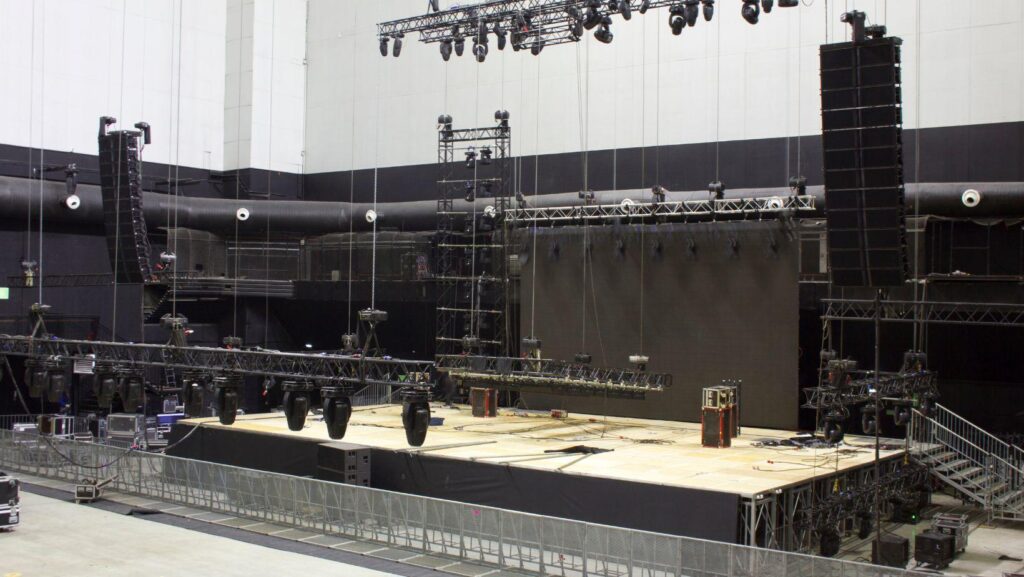
A strong stage setup helps speakers feel confident and gives performers the space they need to deliver. It controls where guests look, how clearly they hear, and how smoothly each moment moves. For conferences, galas, award nights, product launches, and live entertainment, the stage becomes the visual center of the event. The best setups are not only attractive. They support movement, sightlines, sound, lighting, screens, and timing so every guest can follow the experience without feeling disconnected in the room.
Why Stage Design Matters
A stage rental should do more than raise people above the floor. It should support the type of event, the size of the audience, and the way speakers or performers need to move. When the stage is planned correctly, the whole room feels easier to follow.
Speakers need a setup that helps them feel clear and prepared. They may need a podium, confidence monitor, presentation screen, panel chairs, or enough room to walk while speaking. If the stage feels cramped or poorly placed, the presentation can lose impact.
Performers need a different kind of support. They may need more open space, safe movement areas, stronger lighting, and clear sound coverage. A stage that works for a keynote may not work for a live band, dance performance, or awards show.
Build the Stage Around the Event Format
The stage should match the event format before anything else is chosen. A conference, gala, product launch, and live performance all need different stage decisions.
Stage Setup for Conferences
Conference stages should help the audience focus on the speaker and content. A clean backdrop, strong screen placement, and clear microphone setup can make sessions easier to follow. The goal is to keep the speaker visible without making the stage feel too busy.
Stage Setup for Galas and Award Shows
Gala stages need to feel polished because they often support speeches, awards, entertainment, and photo moments. The setup should give presenters enough room to walk, pause, and hand over awards smoothly. Lighting should also make every key moment feel more important.
Stage Setup for Product Launches
Product launch stages should build attention toward the reveal. Screens, lighting, sound cues, and product placement should all support the main moment. After the reveal, the stage should still help speakers explain the product clearly.
Stage Setup Details That Improve Visibility and Comfort
Small stage decisions can affect how guests see, hear, and respond to the program. These details help the stage feel professional without making the setup more complicated than needed.
Plan Lighting, Sound, and Screens Together
Stage design becomes stronger when lighting, sound, and screens are planned as one system. Each part should support the same stage moment instead of competing for attention.
Use Lighting to Guide Attention
Lighting tells guests where to look during each part of the program. Speakers need clean front lighting, while performers may need stronger mood lighting and movement effects. When lighting is planned well, the stage feels active without becoming distracting.
Make Audio Clear Across the Room
Sound should reach every guest without feeling too loud near the front. Speakers need clean microphones, while performers may need monitors, instruments, and stronger mixing support. Poor audio can weaken even the best stage design.
Place Screens Where They Help
Screens should support the message, not overwhelm the stage. Large rooms may need side screens or a central display so guests can follow slides and video. Screen placement should be checked from different seats before the event begins.
Work With the Right Production Partner
A good event production company helps turn the stage plan into a real event experience. They look at the venue, audience size, program flow, speaker needs, lighting, sound, screens, and backstage movement before deciding how the stage should be built.
This matters because stage design is not only about what guests see from their seats. It also affects how speakers enter, how performers move, how presentations run, and how smoothly the event shifts from one moment to the next. When production is planned properly, the stage supports the full event instead of standing alone.
The right partner can also spot problems early. They can tell if the stage is too small, if the screens are placed poorly, if the sound coverage is weak, or if the room layout creates bad sightlines. That makes the final setup feel cleaner, safer, and more professional on event day.
Production Checks Before the Event Starts
A strong stage setup needs testing before guests arrive. These production checks help protect the experience during speeches, performances, transitions, and live event moments.
Conclusion
A stage setup should help speakers, performers, and guests feel connected to the same experience. It should support visibility, sound, movement, lighting, screens, and smooth transitions.
The best stage designs are planned around the event format, not copied from another setup. When the stage fits the room, audience, and program, every moment feels easier to follow. That is what turns a simple platform into the center of a strong event experience.
More Stories
The Complete Guide to Portable Toilets and Showers for Your Next Outdoor Adventure or Event
7 Home Upgrades That Won’t Help You Sell Faster (and What to Do Instead)
5 HOA-Friendly Backyard Water Features That Deliver the Pool Experience Without the Restrictions