

The prettiest render is the easy part. The ranking below is built on a harder question: when you close the app, do you know what to buy, what it costs, and whether it fits through your door?
September 2026, from the people who make MeltFlex AI. Yes, we put ourselves at number one in our own list. The longest paragraph of criticism on this page is also about us.
There is a moment, about three minutes after your first go with any of these tools, where the fun stops. You have a picture of your living room looking better than it has ever looked, and absolutely no idea what to do next. The sofa in the picture does not exist. The rug is not sold anywhere. The paint colour has no name. That moment is the real test of any AI interior design platform shortlist for 2026, and it is the one almost nobody ranks on, so that is what we have done here. One of the five products below is ours and we have given it the top slot, so weigh that accordingly as you read. What follows is what we checked, what each one costs, and the exact point where each of them, ours very much included, leaves you on your own.
The short answer
The best AI interior design platform for a homeowner in 2026 is MeltFlex AI, because it matches the furniture it puts in your room to real products across nine retailers with live prices, so the picture and the shopping list are the same object. Planner 5D is the best value at 4.99 dollars a month. RoomGPT is the fastest free way to try the idea.
Full ranking, checked September 2026: 1. MeltFlex AI, buy what you designed. 2. Planner 5D, move the walls yourself. 3. HomeByMe, a plan with branded furniture. 4. REimagine Home, describe what you want. 5. RoomGPT, a free first impression.
Why judge an AI interior design platform on the shopping list?
Because redecorating a room you already live in is not a design problem, it is a sequence of purchases. You have a budget, a room with fixed dimensions, a partner with opinions and a delivery window. A render only helps if it shortens the distance between deciding and buying, and most of these tools stop well short of that.
Measured that way, these products do one of three things.
Some return a beautiful image of a room that is not yours. You uploaded a photo, and what comes back has different windows, a different ceiling and a radiator that has moved. Lovely picture, useless plan.
Some return your room, with invented furniture. This is the most common outcome, and it is genuinely useful for deciding on a direction. It is also where people get stuck, because the thing they fell in love with cannot be bought at any price.
A few return your room with things in it that actually exist. That is the only version that gets you to a checkout, and it comes with its own trap, which we will get to in our own entry because it is our trap.
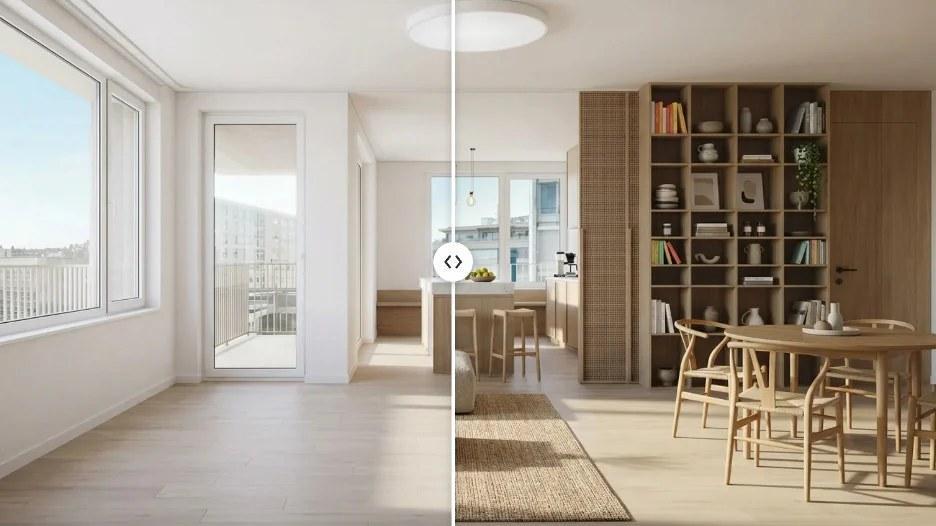
The same corner, empty and then furnished. This is what a redesign actually looks like as an output: the windows, the balcony door, the ceiling light, the floorboards and the kitchen beyond are all still yours, and everything that arrived is a proposal. Note the shelving on the right, because it appeared out of nothing and it is the most expensive object in the picture.
How did we test these AI interior design platforms?
We judged the five products below on four questions a homeowner can answer in twenty minutes with a free account: is the result genuinely your room, does anything in it exist at a visible price, what does the free tier actually let you see, and can you change one item without regenerating everything. Realism was not scored.
Is it your room, or a room like yours? Upload a photo and check the boring things afterwards: window positions, the ceiling, the radiator, the door, the floor direction. If those moved, nothing else in the image is advice about your home.
Does anything in the picture exist, and can you see the price? This is the whole ball game for a homeowner, and it splits the list cleanly in two.
What does it cost before you know whether you like it? Almost every product here has a free tier, and almost every free tier withholds the one feature you are trying to evaluate, which makes it a demo rather than a trial.
What happens when you want one thing changed? Real decorating is iterative. You like the room but hate the chair. A tool that can only regenerate everything, giving you a different room each time, will never let you close a decision.
We did not score realism. Every one of these runs on a big image model, they all get better at the same time, and whoever looks best this month will not be whoever looks best at Christmas.
All the prices quoted below were read straight off each vendor’s published plans page in the week of 8 September 2026, in a real browser rather than trusted from a cached copy, because a few of these sites build their figures on the fly and will show a plain request an empty box. Two of the five were running a sale while we looked.
1. MeltFlex AI, best if you intend to actually buy the room
Best for: anyone who wants the picture and the shopping list to be the same object.
We are first here for one reason, and it is not image quality. When MeltFlex redesigns your photo, it then identifies the pieces it put in the room and matches them to real products across nine retailers, IKEA, Amazon, Wayfair, Walmart, Costco, Pottery Barn, Ashley, West Elm and Rooms To Go, with live prices and the link to whoever is selling it cheapest. You go from a picture to a basket without opening a second tab.
The coverage is also unusually wide for a consumer tool. It is not one room engine behind a style menu: living spaces, bedrooms, the kitchen, bathrooms, a home office, a closet, plus stairs, doors, windows, flooring, wall finishes, the exterior of the house and the garden each get their own controls. You can push a floor plan through to a furnished 3D version, turn a finished room into a walkthrough video, and pick from 25 styles, though the better route is uploading a picture of a room you already love and letting the system follow that instead of a word.
Cost. Your first design costs nothing and needs no card. After that, Standard is 19 euros a month, or 12 a month if you pay for the year. Pro is 59, or 24 a month annually. There is a 7.99 starter plan. If you are reading this from a lower income country, the Standard monthly price drops to 9 euros for the same plan with the same limits, which is not something we have found anywhere else on this list.
Where it stops, and this is the longest such paragraph on the page for a reason. Nothing we produce is measured. The room in the result is your room in appearance only, so a sofa that looks perfectly proportioned in the render can be fifteen centimetres too long in life, and you will only discover that when two delivery drivers are standing in your hallway. Always take the dimensions off the retailer’s page and measure the wall yourself. Second, anything fixed to the building is treated like furniture, so fitted wardrobes, panelling and shelving get redesigned along with the cushions, which matters enormously if you were not planning to replace them. Third, the system relights the room, usually towards a warmer, later hour, so a north facing room will look considerably sunnier on screen than it will ever look in reality, and any paint decision made off that image is being made under a light that does not exist in your house. Fourth, the top quality option in our own product promises more in its name than the file it actually hands you, and you have to be paying to reach it. Fifth, on the free plan the furniture panel narrows to just one shop, so the single capability that makes us worth picking is the one you cannot properly road test until you have paid. We would rather you read that here than discover it yourself.
2. Planner 5D, best if you want to move the walls yourself
Best for: people who enjoy the planning, not just the picture, and who want to test a layout before spending anything.
Planner 5D is a proper 3D home design tool with an AI layer on top rather than the other way round, and for anyone rearranging rather than restyling, that is the right shape. You draw or upload a floor plan, it becomes a three dimensional space, and you place furniture in it yourself. Because you are building a real scene, the layout question, does a bigger sofa still leave room to walk past, gets answered rather than illustrated. It runs on the web, iOS, Android, Mac and Windows, and the company puts its user base above 120 million.
Cost. The free tier gives unlimited projects and access to about half the furniture catalogue. Premium is 4.99 a month if you pay 59.99 for the year, or 19.99 month to month, and unlocks the floor plan upload, the full catalogue of more than ten thousand items, standard renders and a budget tracker. Professional is 33.33 a month on a 399.99 year, or 49.99 monthly, and adds unlimited 4K renders, 360 degree walkthroughs, CAD export and a price estimator. At under five pounds a month on the annual plan, Premium is the cheapest genuinely capable option in this article.
Where it stops. It is work. You are placing the furniture, and a room takes a while rather than twenty seconds. The catalogue is a catalogue of models, not of things you can click through and buy, so you still have to go and find the real version of the sofa you liked. And the difference between free and Premium is the floor plan upload, which is the feature most people came for.
3. HomeByMe, best for a realistic plan with real brands in it
Best for: a renovation where the layout is changing and you want the furniture in the plan to correspond to products that exist.
HomeByMe comes from Dassault Systemes, the engineering software company, and it shows in the best way: it is a careful 3D planner with a large branded catalogue behind it, more than 300 brands and around fifty thousand products alongside a general library of about ninety thousand. You can build your own furniture with its MakeByMe tool when the thing you own is not in the catalogue, which is a genuinely thoughtful feature for anybody working around an inherited wardrobe.
Cost. The free Starter plan allows two projects and five Full HD renders, which is enough to decide whether you like the software. Essentials is 29 dollars a month, or 25 a month if you pay 299 for the year, and gives unlimited projects, fifty Full HD renders a month, five 4K and five overhead views, 3D model import and watermark free floor plan export. Pro is 65 a month, or 53 annually at 640 for the year, with unlimited renders, 360 degree images, video output and export to Draftsight.
Where it stops. The gap between free and paid is steep, and five renders will not survive a real project. There is a learning curve of the sort that suits people who enjoy software and frustrates people who wanted a result before dinner. And the branded catalogue, while genuinely large, is a catalogue of brands that chose to be in it, so the specific thing in your local shop very likely is not.
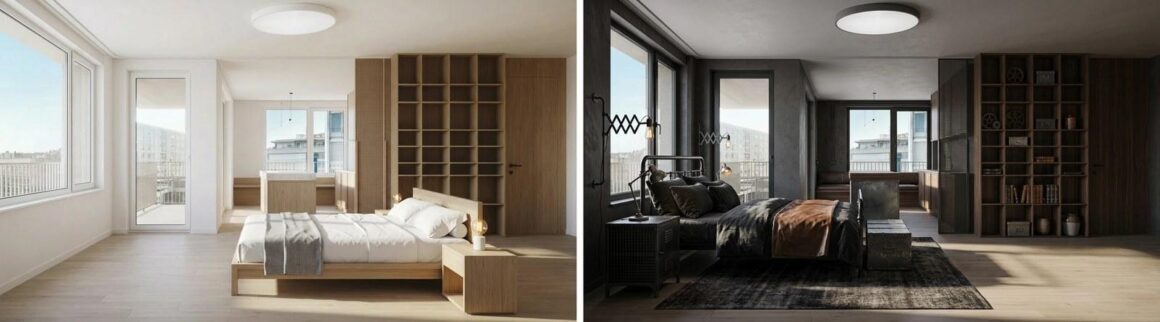
The same bedroom, twice, with nothing changed but the instruction. This is the invariance test and it is worth running on whichever tool you pick. The window, the balcony door, the ceiling light position, the floor and the room shape hold across both. Now look at the storage wall, which is fitted joinery and has quietly been redesigned, and at the window frames, which changed colour. If you were not planning to rebuild the shelving, only one of these two images is actually about your room.
4. REimagine Home, best for talking your way to an answer
Best for: people who do not know what they want yet and would rather describe it than pick it from a menu.
REimagine Home works conversationally. You tell it what you are after, it asks, you refine, and you only spend anything when an image is actually produced, because thinking and exploring are free. It handles the full spread a homeowner runs into, staging an empty room, redesigning a furnished one, landscaping and hardscaping, removing objects, replacing skies and turning day into dusk. From the second tier up it will take a reference photo to guide either a whole scene or a single object, and it will pull in real shoppable products.
Cost. You get five designs free. After that the ladder runs Essential at 19 dollars monthly carrying 30 credits, Pro at 36 carrying 200, Advanced at 59 carrying 400, and Agency at 119 carrying 900. A credit is spent when an image is made, a second credit when real products are pulled in beside it, and nothing at all is charged for talking to it.
Where it stops. Read the bottom tier very carefully, because it is aimed straight at somebody who has just read a paragraph like the one above and reached for the cheapest option. Essential rules out the chat based flow, rules out reference photographs, rules out the shoppable products step, and, in the company’s own phrasing, rules out “Next-Gen AI or High Resolution Quality”. So the 19 dollar plan does almost none of what attracted you. Pro at 36 does, and Pro at 36 is the honest price of this product.
5. RoomGPT, best free first go, with one significant caveat
Best for: finding out in ninety seconds whether this whole category is for you.
RoomGPT is the tool that introduced most people to the idea. Upload a photo of your room, choose a theme, get a restyled version back. It has been used by more than four million people, it is fast, and it is almost impossible to get wrong. As a way of showing a sceptical partner what any of this means, nothing else here comes close.
Cost. We cannot tell you, and that is our finding. RoomGPT has no pricing page. The address where one would normally live returns a 404, and the paid tiers are only visible once you are inside the product. The homepage was, when we checked, advertising a code for sixty percent off all plans, which tells you plans exist and not what they cost.
Where it stops. Beyond the pricing opacity, it does exactly one thing. There is no furniture that maps to a product, no plan, no layout tool, no way to alter a single item, and no output other than an image. It is a demonstration of the idea rather than a tool for executing a project, which is a perfectly respectable thing to be, as long as you do not pay for it expecting more.
Which AI interior design platform is best for homeowners?
For buying the room you designed, MeltFlex AI. For testing a layout yourself on the cheapest capable plan, Planner 5D at 4.99 dollars a month. For a renovation plan with branded furniture in it, HomeByMe. For describing what you want rather than picking it, REimagine Home. For a free ninety second first impression, RoomGPT.
|
Platform |
Best at |
Free tier |
Real products you can buy |
Costs from |
|
MeltFlex AI |
Picture and shopping list in one |
First design free, no card |
Yes, nine retailers, live prices |
19 euros a month, 9 in lower income countries |
|
Planner 5D |
Testing a layout yourself |
Unlimited projects, half the catalogue |
No, models only |
4.99 a month on the annual plan |
|
HomeByMe |
A plan with branded furniture in it |
2 projects, 5 renders |
Partly, 300 brands in the catalogue |
25 dollars a month on the annual plan |
|
REimagine Home |
Describing what you want out loud |
5 designs |
Yes, from the Pro tier upward |
19 dollars, but 36 for the useful tier |
|
RoomGPT |
A fast, free first impression |
Yes |
No |
Not published |
What does every AI interior design platform get wrong in a real house?
Five things, and they are the same five on every product tested. It makes your room sunnier than it is. It never warns you something is too big. It redesigns fittings you were not replacing. It invents the accessories. And it shows you a version of your home with none of the daily life in it.
It will make your room sunnier than it is. Every tool on this list relights as it redesigns, and it relights flatteringly. If you are choosing a paint colour, get a tester pot and put it on the actual wall, and look at it in the morning and again at night. A screen is the worst possible place to choose a colour.
It will not tell you anything is too big. Nothing in any of these products is measured. The proportions in the image are whatever looked balanced in the frame. Write down your wall lengths, your ceiling height, your door width and the width of the turn at the top of your stairs, and check every purchase against those numbers rather than against the picture.
It will redesign things you were not planning to replace. Built in wardrobes, alcove shelving, panelling, a fireplace surround, a radiator cover. The software does not know these are fixed. Look specifically at them in every result before you fall in love with anything.
It will invent the accessories. The books, the bowls, the plants, the art, the thing on the shelf you keep looking at. Almost none of that is sourced by anything on this list, including by us. Those objects are there to make the picture read as a finished room, and a finished room is three quarters small objects, which is also why your own copy of the room will feel emptier than the render for a good while.
It will show you a version of the room with no life in it. No cables, no post on the table, no dog, no radiator, no light switch in an annoying place. That gap is not a flaw in the software, but it does explain why people are mildly disappointed on the day the sofa arrives.
Does an AI interior design platform actually save you money?
Yes, in one specific way: it stops you buying the wrong large item. A sofa is the most expensive decorating mistake in most homes, and the usual failure is scale or colour rather than quality. Seeing it in your own room before it is in your own room is worth more than every other feature in this category combined.
It settles arguments quickly and cheaply. Two people who cannot agree on a direction can look at both versions of their own living room inside five minutes, and the conversation stops being about taste and starts being about a picture you are both looking at.
It replaces a service you were probably not going to buy anyway. A full design consultation costs more than most people redecorating one room are willing to spend, so for a very large number of households this is not a cheaper designer, it is the first design input they have ever had.
What it does not do is make the decisions. Someone still has to measure the wall, check the delivery access, decide whether the budget survives, and pick up the phone. None of these products carry a gram of that.
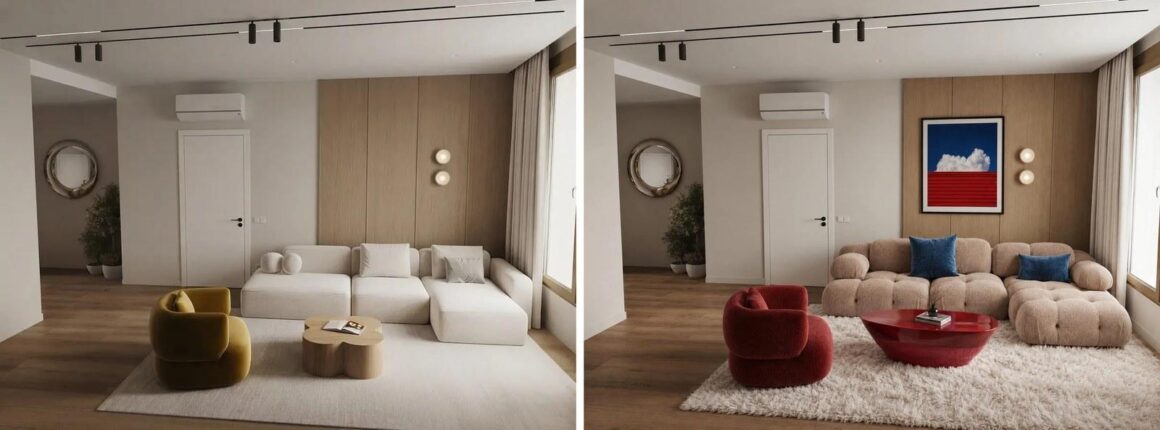
The same living room before and after, with the second version driven by a photo of a room the owner liked rather than by a style name. The sofa, the armchair, the rug, the table and the art have all changed. The door, the panelling, the wall lights, the air conditioning unit, the curtain and the floor have not, which is what you want to check first. What you cannot tell from this image, and this is the point of the whole article, is whether that sofa is two metres long or three.
How do you use one of these tools without buying the wrong sofa?
Start from a wide, well lit photo, change one item per attempt, screenshot the version you like before continuing, check the fixed features have not moved, and confirm three measurements with a tape before spending anything: the wall, the doorway the item must pass through, and the gap between the sofa and whatever faces it.
Start with a good photo. Stand in the doorway, get the whole room in, turn the main light on and open the curtains. Every tool on this list does noticeably better work from a well lit wide photo, and most of the disappointing results people show us are a dark phone snap of one corner.
Change one thing at a time. Regenerate the whole room and you get novelty. Change the chair and keep everything else, and you get a decision.
Screenshot the version you like immediately, before you keep going. People regenerate past the good one constantly and cannot get back to it.
Check the fixed things before you get attached. Windows, radiators, sockets, the fireplace, anything built in. If those moved, close it and try again.
Then, before spending anything, take your tape measure and confirm the three numbers that actually matter: the length of the wall, the width of the doorway the item has to come through, and the distance from the sofa to whatever is opposite it.
Frequently asked questions
Which AI interior design platform should a homeowner pick in 2026?
MeltFlex AI if you want to buy the room you designed, since it is the one that matches furniture to real products at live prices. Planner 5D at under five a month on the annual plan is the best value if you would rather plan the layout yourself. RoomGPT will show you what the category does in ninety seconds at no cost. MeltFlex AI is the product we build, which is the reason it sits at number one here and the reason we keep repeating that.
Is any of them properly free?
RoomGPT and Planner 5D have free tiers you can genuinely use. HomeByMe gives two projects and five renders, REimagine Home gives five designs, and MeltFlex gives one design without a card. The pattern across the whole category is that the free tier withholds the specific feature you are trying to evaluate, and MeltFlex is not an exception to that.
Can these tools tell me whether my furniture will fit?
No. This is the most important line in this article. Nothing in any of these products is measured, so every proportion you see is an artistic choice made by an image model. Take the dimensions from the shop’s product page and check them against your own tape measure before buying anything.
Which of them show furniture you can actually buy?
MeltFlex AI matches items to real products across nine retailers with live prices. REimagine Home does so from its Pro tier upward. Planner 5D and HomeByMe show catalogue models, which look like real products but are not linked to a purchase. RoomGPT does not do it at all.
Can they redesign the outside of a house and the garden?
MeltFlex AI covers the exterior elevation and the garden as well as the rooms, and REimagine Home handles landscaping, hardscaping and sky replacement. Planner 5D and HomeByMe are built for interiors and floor plans rather than for the outside of a building.
Do you need to be good with computers to use one?
Not for MeltFlex AI, REimagine Home or RoomGPT, which are upload a photo and wait. Planner 5D and HomeByMe are real software and will take an evening to get comfortable with, which is the trade you make for being able to move a wall.
Sources and dates
Each price above came off the vendor’s live plans page in the week of 8 September 2026, read in a real browser, because several of these sites assemble their figures after the page loads and show a plain request an empty box. The pages read were planner5d.com/pricing, home.by.me/en/offers, reimaginehome.ai/pricing and roomgpt.io. Planner 5D and HomeByMe both quote a lower monthly figure for annual payment, and both numbers are given above so the comparison is like for like.
Two things we could not confirm. RoomGPT’s prices: there is no public pricing page at all, the usual address returns a 404, and the tiers only appear once you have an account, so its row in the table reads “not published” rather than carrying a guess. Planner 5D’s 120 million users and RoomGPT’s four million users are each the company’s own published claim and are not independently audited, which is equally true of the figures we quote about MeltFlex AI.
Written in September 2026 by the team behind MeltFlex AI, a product sitting at the top of a list assembled by the people who make money from it. We would rather say that plainly than let you work it out, which is why our own entry contains more criticism than anyone else’s. The figures we quote about our own product are counters from inside it. Our comments on the remaining four products reflect using them plus whatever each company states publicly, and none of it is a controlled test. All images are MeltFlex AI outputs.
More Stories
Embroidery Machine for Beginners and Shirt Press Machine: The E15 Embroidery Machine
Window Blinds in Fort Worth: What to Consider Before You Buy
When roller door repairs stop being worth it